Choppy Orc Arcade Platformer
Reviews
💡Choppy Orc offers a refreshingly simple and positive platforming experience. The controls are responsive, and the axe mechanics add a unique twist without any violence. The pixel art is charming, and the soundtrack is calming. Levels are well-designed for short sessions, and the game has good replay value for casual players. It is a safe, family-friendly choice that avoids common pitfalls of online games.
Description
Game Introduction
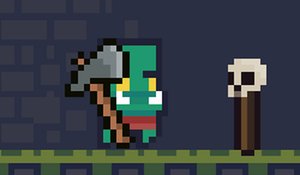
Choppy Orc is a delightful platformer game where you take control of a friendly Orc who enjoys chopping things with his trusty axe. The goal is to navigate through various levels, avoid obstacles, and use the axe to interact with the environment. There is no violence or inappropriate content, making it a safe choice for players of all ages. The game emphasizes fun and creativity, offering a wholesome experience that families can enjoy together. With charming pixel art and a relaxing soundtrack, it provides a unique and enjoyable adventure.
How to Play
To play Choppy Orc, use the WASD or Arrow keys to move your character. Press W or the Up Arrow key to jump. Use the Spacebar, X, or J key to use your axe. If your keyboard does not support anti-ghosting, avoid using the Spacebar to throw the axe and use J or X instead. Press R to restart the level, M to mute sound, and Escape to access the menu. For Xbox controller users, move with the D-pad, press Button A to jump, Button X to use the axe, Button Start to restart, Button Y to mute, and Button Back for the menu. The controls are intuitive and responsive, making it easy for anyone to pick up and play.
Game Features
Simple platformer with axe-chopping action. Levels that encourage exploration and interaction. Relaxing soundtrack that enhances the gameplay. Family-friendly design with no violence. Responsive controls for keyboard and controller.
Tips for Success
To succeed in Choppy Orc, practice using the axe to interact with various objects and obstacles. Take your time to explore each level, as hidden paths may lead to rewards. Use the mute and restart functions to customize your experience. For smoother gameplay, avoid using the Spacebar if your keyboard has ghosting issues, and try the alternative keys J or X. With patience and practice, you'll master the levels and enjoy the charming world of Choppy Orc.
Compatibility
This H5 game runs smoothly on: • Desktop computers (Windows / Mac) • Mobile phones (iPhone / Android) • Tablets (iPad / Android) 🌐 Best experienced with Chrome, Safari, or Edge